

A grocery price book, whether it's a notebook, a Google Sheet, or a simple app, lets you log unit prices across stores so you can spot true rock-bottom deals instead of guessing. Tracking prices regularly helps many shoppers save a noticeable percentage on their grocery spending over time. Below, we cover the setup, the templates, and the habits that make it work.
TL;DR:
- Use a spreadsheet when comparing three or more stores or sharing entries; seed it with two or three recent receipts to establish a baseline.
- Convert package sizes to the same unit before comparing, then divide each price by its size; a larger package can still cost more per ounce.
- After tracking for three to four months, stock up when an item’s price falls within 5% to 10% of its recorded low.
- Keep names, units, and dates consistent, and record regular and sale prices; promotions often last two to four weeks, so infrequent updates can miss them.
Table of Contents
- What a Grocery Price Book Actually Tracks
- Why Tracking Prices Pays Off Right Now
- How to Create Your Price Book Step by Step
- Using Your Price Book to Spot the Best Deals
- Templates and Printables to Get Started Today
- Why Unit Price Beats the Sticker Price
- Common Mistakes That Quietly Break a Price Book
- Tracking Prices Beyond the Grocery Aisle
- A Deal I Almost Missed Without a Price Book
- Let OutletPicks Handle the Unit-Price Math for You
- FAQ
- Sources
What a Grocery Price Book Actually Tracks
A grocery price book is a running log of what you pay for items at different stores over time. Some people keep it on index cards, others in a Google Sheet, and a growing number use a budgeting app with a notes field. The format matters less than the habit of writing down the same details every time.
At minimum, log these fields for every entry:
- Item name, written the same way each time (not "yogurt" one week and "Greek yogurt" the next)
- Store where you bought it
- Size or unit (ounces, pounds, count)
- Price paid, including sale price if applicable
- Date of purchase
Optional extras worth adding once you're comfortable: brand, package count, and whether a coupon or promotion applied. Standardizing units matters because a 16-ounce jar at one price and a 24-ounce jar at another look incomparable until you convert both to a per-ounce cost. Skip that step and you'll end up "saving" on the more expensive option without realizing it.
Why Tracking Prices Pays Off Right Now
Grocery prices aren't static, and the direction has been up. Food-at-home prices rose 2.7% over the 12 months ending June 2026, according to the Consumer Price Index, which means the same cart costs more than it did a year earlier even before you factor in brand switching or package shrinkage.
A price book turns that drift into useful information: systematic tracking has been linked to savings of roughly 10 to for shoppers who compare unit prices before buying. Retailers run "sales" constantly, but many of those discounts just bring a price back to its normal range rather than below it. Without a recorded history, you can't tell the difference between a genuine rock-bottom price and a marketing nudge.
How to Create Your Price Book Step by Step
Pick a format first. Paper works well if you shop at one or two stores and want something you can scribble in at the register. A Google Sheet works better if you compare three or more stores, want automatic unit-price math, or shop with a partner who also adds entries. A budgeting app can work too, but most lack a clean way to compare unit prices across stores, so a spreadsheet usually wins for this specific job.
- Set up your columns: Item, Brand, Size, Unit, Price, Store, Date, Notes. The "Unit" column should specify ounces, pounds, grams, or count, not just a number.
- Standardize units before entering anything. If one package lists 1 pound and another lists 20 ounces, convert both to ounces (1 pound = 16 ounces) so your unit-price column compares correctly.
- Add a unit-price formula in Sheets: divide price by size, for example
=Price/Size, then format that column as currency with four decimal places so small differences show up. - Seed the book with your last two or three receipts rather than starting from zero. This gives you an immediate baseline instead of waiting weeks to see any data.
Our unit-price calculator guide walks through the same formula with worked examples if you want to double check your setup.
Pro Tip: Photograph every receipt before you leave the parking lot. It takes ten seconds and saves you from losing the one piece of paper your whole price book depends on.
Using Your Price Book to Spot the Best Deals
Once you have a few weeks of entries, the real value starts: comparing unit prices across stores and pack sizes to see which one actually wins. A 12-pack of paper towels at one price per roll might lose to a 6-pack at a different store once you divide both down to a per-roll cost.
- Calculate unit price for every entry by dividing total price by size, then compare that number across stores, not the sticker price
- Watch for pack-size tricks, where a "bigger" package actually costs more per unit than the smaller one
- Give yourself an observation window. Personal finance guides generally recommend tracking a category for about three to four months before you can identify the recurring rock-bottom price rather than a one-off dip.
- Set a stock-up trigger, such as buying in bulk when the price lands within 5 to 10% of the lowest price you've recorded for that item
- Log at checkout or within the same day, while the receipt and any sale signage are still fresh in your memory
Our guide to the 3-month stock-up rule breaks down how to set those triggers by category if paper towels, canned goods, and proteins all need different thresholds.
Pro Tip: Keep a separate "historical low" column that only updates when you beat the previous record. That single number becomes your buy signal.
Templates and Printables to Get Started Today
You don't need to design anything from scratch. A compact printable page works well with one row per purchase and columns for Item, Store, Size, Price, Unit Price, and Date, laid out so a single page covers 15 to 20 entries. Print several copies and keep one in your bag or car.
For a digital setup, a Google Sheets layout with tabs by category (produce, dairy, pantry, household) keeps things organized as your log grows. The unit-price formula stays the same across tabs: divide the price cell by the size cell, then sort that column to surface your cheapest option instantly.
- Photograph receipts immediately after checkout so you never lose the source data
- Use voice-to-text on your phone to add entries while still in the parking lot
- Color-code rows by store if you shop at more than two regularly
Why Unit Price Beats the Sticker Price
The number on the shelf tag tells you what you'll pay today. It doesn't tell you whether that's a good deal, and a small error in your math, like mixing up fluid ounces and dry ounces, can flip your decision entirely. Unit-price comparisons only work when every package is converted to the same unit first, whether that's per ounce, per hundred grams, or per serving.
This is the same logic we apply at scale across retailers:
- We calculate real cost per unit, not sticker price, across categories so pack size and brand stop hiding the actual cost
- We recheck retailer prices on a rolling cycle rather than a single snapshot, which matters because sale prices shift week to week
- Our brand index and unit-pricing primer are useful references if you want to sanity check your own manual calculations
Common Mistakes That Quietly Break a Price Book
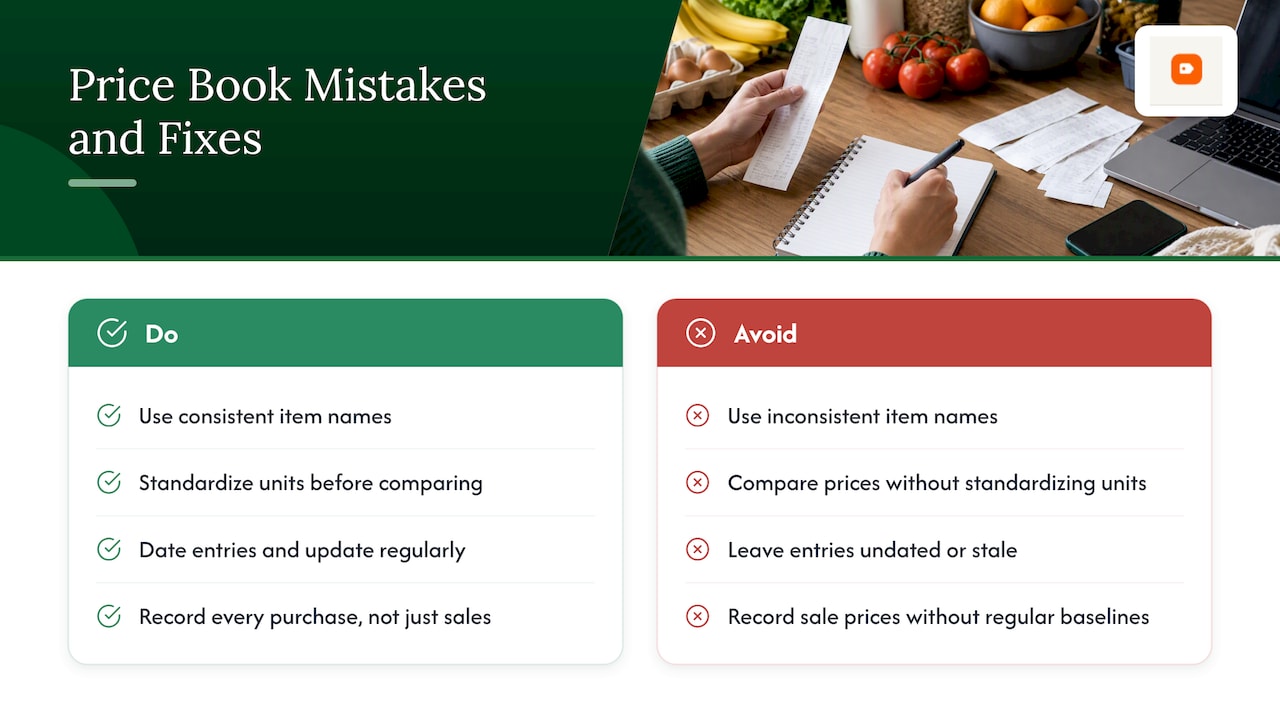
The most common mistake is inconsistent item naming. If you log "eggs" one week and "large eggs, dozen" the next, your sort and compare functions stop working, and you lose the ability to spot trends.
A second frequent error is forgetting to standardize units before comparing. Writing down "$4.99" without noting whether that's for 12 ounces or 16 ounces makes the entry useless a month later when you're trying to decide if a new price is actually lower.
Letting the book go stale is another trap. A price book you update once a month barely captures sales cycles, since many grocery promotions run in two to four week windows. Entries also need a date, because "price paid" without a timestamp tells you nothing about whether a deal is still available or whether prices have since moved.
Finally, many people record only sale prices and skip regular-price purchases. That creates a lopsided history where everything looks like a discount because you never logged the baseline to compare against. The fix for all of these is the same: pick a consistent format for item names, units, and dates from day one, and enter every purchase, not just the exciting ones.
Tracking Prices Beyond the Grocery Aisle
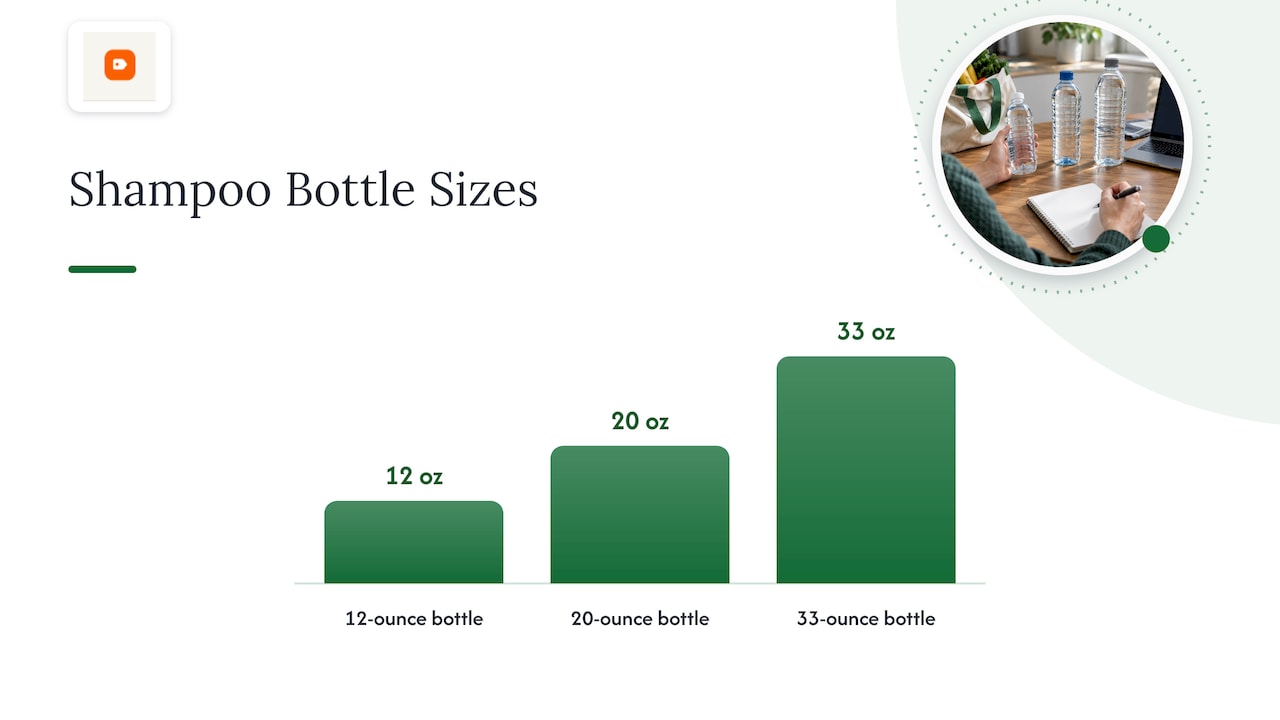
The same price book logic applies to household essentials and personal care items, where pack sizes vary even more wildly than groceries. A bottle of shampoo might come in 12-ounce, 20-ounce, or 33-ounce sizes, and the per-ounce cost often doesn't scale down the way you'd expect from the bigger bottle.
Add a second tab or section to your existing price book for non-food items: paper towels, laundry detergent, shampoo, body wash, diapers, and pet food all benefit from the same Item, Size, Unit, Price, Store, Date columns you're already using for groceries. The unit-price formula doesn't change, you're just dividing price by milliliters, sheets, or diaper count instead of ounces.
These categories often see less frequent but deeper sales than groceries, which makes the three to four month observation window even more useful. Diapers and detergent in particular tend to cycle through steep discounts every six to eight weeks at a given retailer, so a price book that spans a full season will catch more of those windows than one you only check sporadically.
If you'd rather skip the manual math for personal care and household categories, our categories page shows real cost-per-unit rankings across skincare, hair care, body care, and baby care that update on a rolling basis.
A Deal I Almost Missed Without a Price Book
I nearly bought olive oil at what looked like a good sale price, until my log showed the same bottle had hit a lower price twice in the past three months. I waited two weeks and it dropped again, so I bought four. Print a template or open a blank sheet tonight and your first entry starts paying off within a month.
— Alex
Let OutletPicks Handle the Unit-Price Math for You
Keeping a manual price book works, but if you'd rather skip the spreadsheet upkeep for certain categories, we calculate real cost per unit across retailers and update those prices on a rolling cycle so you don't have to re-check them yourself.
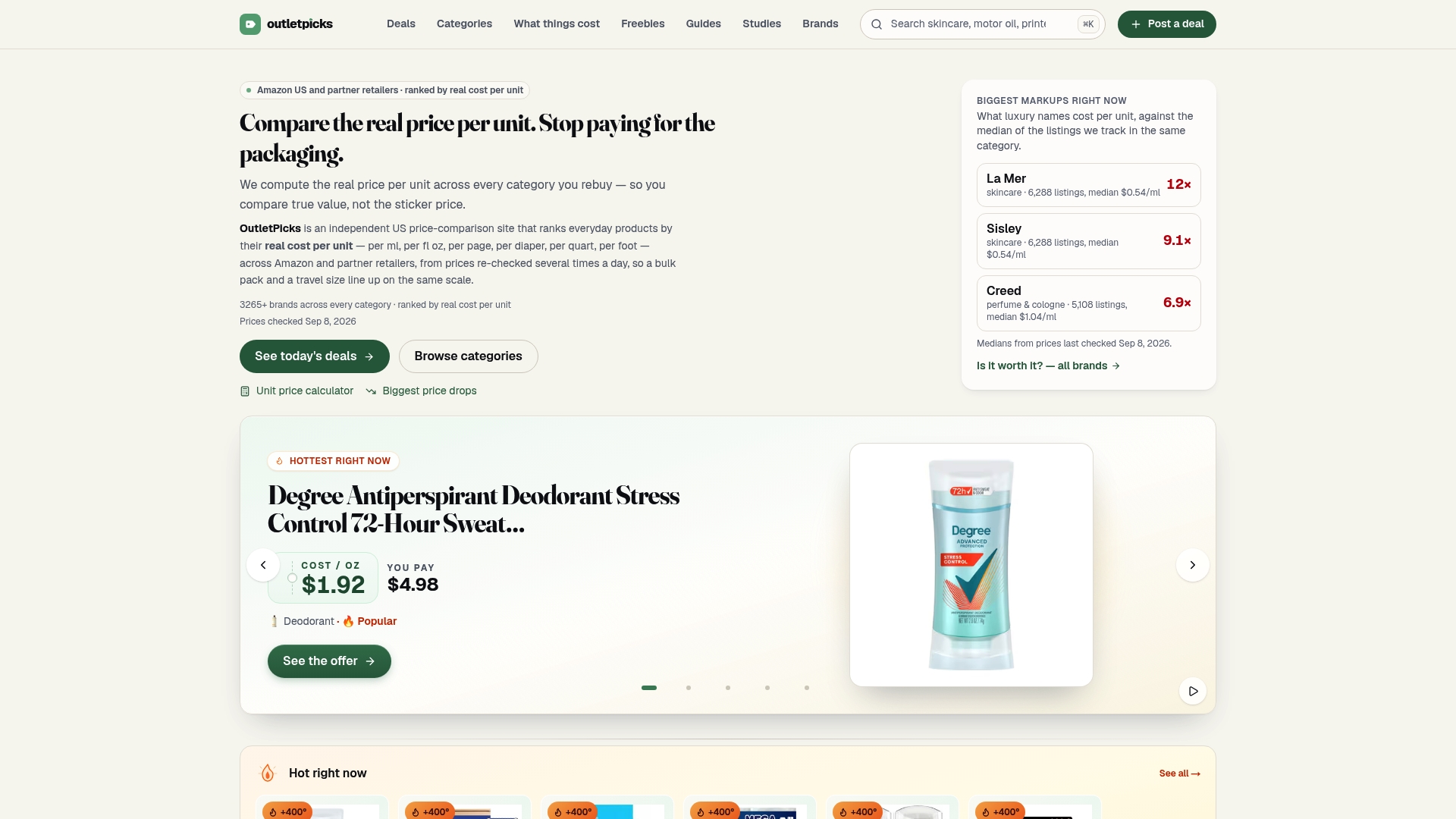
- We rank products by actual price per unit, not sticker price, across a wide range of categories including skincare, hair care, fragrance, body care, baby care, and pet food
- We track price history so you can see whether today's "sale" is actually a historical low based on past pricing data
- Our brand index lets you compare brands side by side on real cost per unit instead of guessing from pack size
For categories you buy often, like shampoo or diapers, check our categories page to see current rankings before your next cart fills up, and pair it with a price-tracking tool like Fox Patrol if you want alerts sent straight to you when a specific product drops.
FAQ
Is $100 a week on groceries normal?
What counts as normal depends heavily on household size, location, and diet, and there's no single figure that applies to everyone. The USDA Food Plans offer benchmark market baskets at different cost levels, so comparing your spending to the Thrifty or Low-Cost Food Plan for your household size gives a more useful answer than a flat dollar figure.
What is the 5 4 3 2 1 rule for groceries?
This isn't a standardized budgeting term with one agreed definition, so claims about it vary across sources. If you've seen it referenced for meal planning or portion guidance, treat it as a loose rule of thumb rather than an official framework.
How much does it cost to own a grocery store?
This question is outside what a grocery price book or unit-price tracking addresses, since it concerns business ownership costs rather than household shopping. We don't have a sourced figure for this and recommend checking industry-specific business resources instead.
What is the best app for buying grocery items at affordable prices?
There's no single best app, since the right tool depends on whether you want unit-price comparisons, price history, or deal alerts. A price-comparison platform that calculates real cost per unit, like our own tools at OutletPicks, works well for cross-retailer comparisons, while a dedicated price-tracking app such as Fox Patrol suits shoppers who want automatic drop alerts.
Sources
- Consumer Price Index news release — June 2026 (BLS)
- USDA Food Plans (Thrifty Food Plan) — Food and Nutrition Service
- How to make a grocery price book — MoneyCrashers