

The fastest way to start price history tracking is a browser extension that overlays a chart right on the product page, since it gives you instant context without leaving the store. Install one, open the item you want, and check whether the current price sits near a 90-day low. For everyday categories where pack sizes vary, cross check the unit cost on a comparison engine before you trust the sticker price.
TL;DR:
- Use a price history tool that clearly shows at least a 90-day trend and confirms the sources of its data to ensure accurate tracking.
- Prioritize tools with confirmed multi-retailer coverage if shopping across multiple sites, and verify their transparency on data collection and privacy policies.
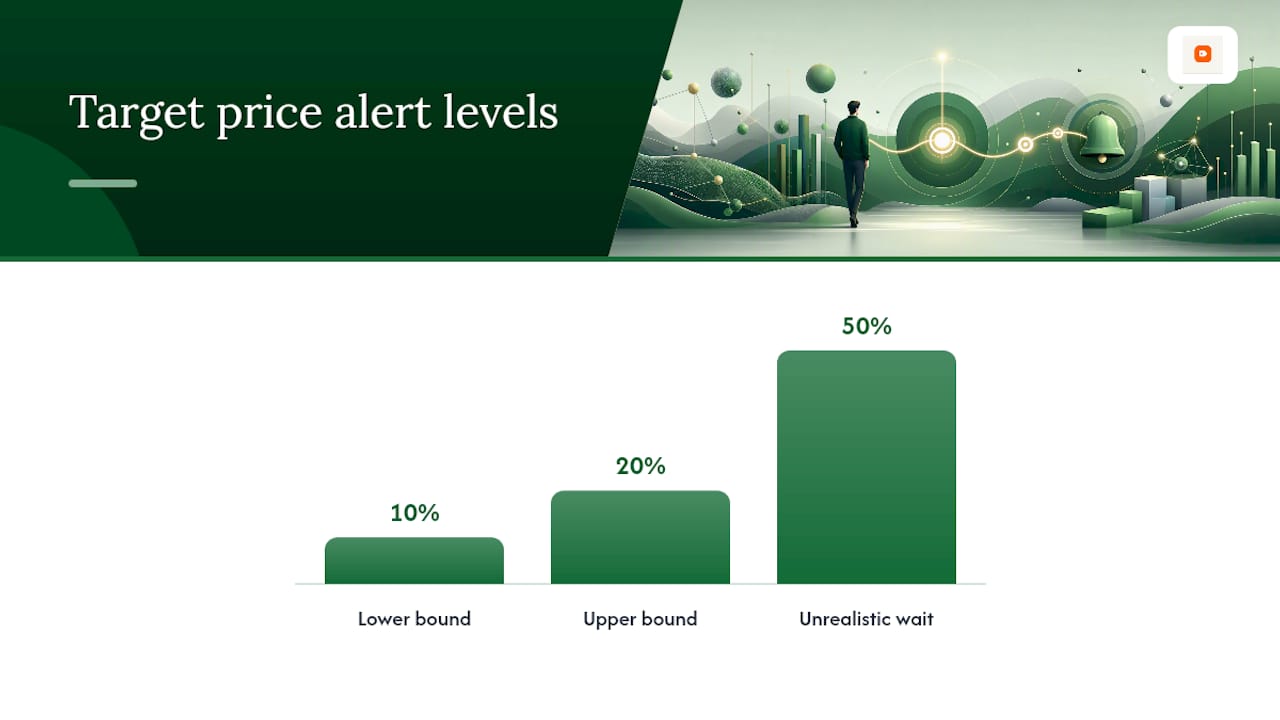
- Set alert thresholds around 10 to 20 percent below the current price and regularly review your targets to avoid missing realistic deals.
- Cross-check unit prices instead of sticker prices when comparing different pack sizes or brands to identify the truly economical choice.
- Rely on automation for big discounts but manually review and adjust your price targets weekly for hidden deals like coupons or single-seller discounts.
Table of Contents
- What Are the Main Ways to Track Price History?
- How Do You Choose the Right Price Tracking Approach?
- How Do You Read a Price History Chart?
- How Do You Set Alerts Without Drowning in Notifications?
- How Does Outletpicks Keep Its Price Data Honest?
- Is Your Data Safe With Price Tracking Tools?
- What Actually Moves the Needle on Savings
- Compare More Than Just the History Chart
- Sources
- FAQ
- Realistic Savings Take Habits, Not Just Tools
What Are the Main Ways to Track Price History?
Five categories cover almost every shopper's needs, and each one solves a different problem. Browser extensions inject a chart directly into the product page you're viewing, pulling from an external database the extension maintains. Retailer built insights, like the price trend module some marketplaces now show at checkout, pull from the seller's own internal data and usually cover only that one store. Standalone trackers and mobile apps run independently of any browser, polling pages on a schedule and sending you a notification when something moves. Price comparison engines take a different approach entirely: instead of tracking one item's price over time, they compare current prices across retailers and normalize them by unit, so you see real value rather than just a number.
Each has a real trade-off. Extensions give you the richest visuals but require broad permission to read the pages you visit, which raises the privacy question we'll get into later. Retailer tools need no installation and involve no extra permissions, but they only see their own store's price history, not the item across the whole market. Standalone apps sit in the middle: decent coverage, no browser permissions, but often capped at a handful of free alerts before you hit a paywall.
| Category | Data coverage | History depth | Alert types | Cost | Integration | Update frequency |
|---|---|---|---|---|---|---|
| Browser extension | Single retailer, deep | Months to years | Email, push, in page | Free to freemium | Browser add-on | Daily to hourly |
| Retailer built insight | One retailer only | Weeks to months | In page indicator | Free | Built into site | Real time on load |
| Standalone tracker/app | Multiple retailers | Months | Push, email | Freemium | Mobile app | Every few hours |
| Price comparison engine | Multiple retailers | Snapshot plus trend | Email (where offered) | Free | Website | Rolling, daily |
Before you pick a category, look for these features:
- Clear labeling of which retailers or sites the tool actually monitors, not just "hundreds of stores" marketing copy.
- A visible chart with at least a 90 day view, not just a single "was/now" price pair.
- An alert method you'll actually check, whether that's email, a phone push, or an in browser badge.
- No requirement to link a payment method just to receive a price alert.
How Do You Choose the Right Price Tracking Approach?
Match the tool to your actual shopping habits, not the one with the flashiest chart. If most of your purchases happen on a single marketplace, a browser extension or that retailer's own price insight tool will cover you fine. If you shop across five or six different sites hunting for the best deal on the same item, you need something with genuine multi-retailer coverage, and you should verify that coverage before committing, since some apps advertise broad tracking but actually cover a narrower set of stores than the listing implies.
Here's a simple way to decide:
- Mostly one marketplace? Use that retailer's built in price history feature first, then add an extension only if you want deeper charts.
- Shopping across many stores for the same product? Choose a standalone tracker or app with confirmed multi-site coverage.
- Comparing similar products by real value, not just sticker price? Use a unit-price comparison engine, especially for household goods, personal care, or anything sold in inconsistent pack sizes.
- Privacy sensitive? Skip tools requiring broad domain permissions and lean on built-in retailer features or Safari's Notify Me instead.
Watch for two red flags: any tool that won't tell you where its price data comes from, and any tool that enables automatic purchasing without a clear, separate confirmation step.
Pro Tip: Set your first target price alert a realistic amount below the current price, such as around 10 to 20 percent. Waiting for a 50 percent drop that may never come is how most people miss the deals that actually show up.
How Do You Read a Price History Chart?
Most charts show three reference lines: the lowest price recorded, the average over the period, and today's price. Amazon's own Price History tool displays 1 month, 3 month, and 1 year views, which is usually enough range to spot a pattern instead of a random blip.
Look for these signals before you buy:
- A sawtooth pattern that repeats monthly often means routine promotions, not a rare discount.
- A steady decline right before a new model launch usually signals the old version is being cleared out.
- A single sharp dip lasting a day or two is likely a flash sale, not the new normal price.
The math is simple: if today's price sits at or below the 90 day average, and it's within that 10 to 20 percent target band experts recommend, buy. If it's sitting above the average with no seasonal dip on the horizon, wait. Say a blender's 90 day average is $80 and it's currently $68. That's 15 percent below average, right in the sweet spot, so you'd buy rather than gamble on a deeper cut.
How Do You Set Alerts Without Drowning in Notifications?
Setting up a useful alert takes four steps: pick the exact product (not a category), set a target price using the 10 to 20 percent rule, choose one notification method you'll reliably see, and confirm the tool actually monitors that specific retailer.
- Search for the exact product listing you want tracked, matching size and variant.
- Set your target price below current cost, 10 to 20 percent lower as a realistic starting band.
- Choose push or email, not both, to avoid duplicate noise.
- Verify the polling interval fits your urgency. Some free tools check as often as every 5 minutes, while others check daily.
Group similar alerts by category so a flood of notifications during a big sale event doesn't bury the one you actually care about. And expect some false positives: a price can jump because a different seller took over the listing, not because the retailer changed anything, so always glance at the seller name before celebrating a drop.
How Does Outletpicks Keep Its Price Data Honest?
Some price comparison engines recheck retailer feeds on a rolling cycle and normalize every price down to a true cost per unit, whether that's per milliliter, per diaper, or per foot of cable. That normalization step matters more than most shoppers realize.
A 32 ounce bottle priced at $12 looks cheaper than a 12 ounce bottle at $6, until you calculate cost per ounce and find the smaller bottle actually wins. Unit-price normalization exists specifically to catch that kind of trap.
Pack size gets manipulated constantly, and sticker price alone hides it every time. Full methodology details are on the Outletpicks methodology page.
Is Your Data Safe With Price Tracking Tools?
Browser extensions typically need broad domain access to inject a chart onto the pages you visit, which means the extension can technically see every site you browse, not just the ones with charts. That's a real trade off worth weighing, not a reason to panic, but it does mean you should only install extensions from developers who clearly state what data they collect and why.
Built-in retailer tools and OS-level features generally sidestep this problem entirely. Apple's Safari, for instance, offers a Notify Me feature that watches any page for price or availability changes without requiring the kind of broad permissions a third party extension needs, and you control the polling interval yourself: hourly, daily, or weekly.
Standalone apps sit somewhere in between. They don't need browser access, but they do need your email or phone number for alerts, so check whether the app sells that contact data to advertisers before you sign up. A price comparison engine, by contrast, requires no account and no permission grant at all since you're simply browsing a public comparison page.
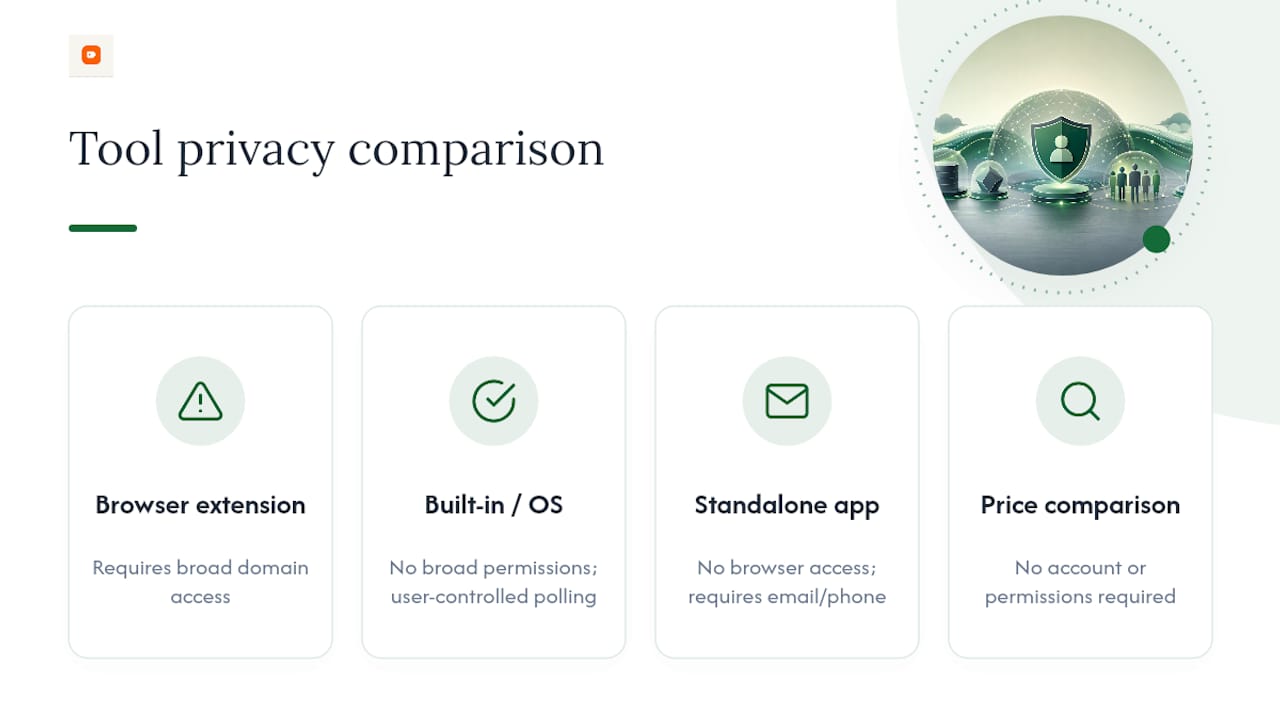
The general rule: the more a tool can see, the more it should tell you about what it does with that visibility. If a tool's privacy policy is vague or missing entirely, that's a stronger warning sign than any missing feature.
What Actually Moves the Needle on Savings
Automation catches the big, obvious drops. It won't catch a coupon code at checkout or a third-party seller's one-off discount, so a quick manual check before buying still pays off. Build one habit: review your target prices weekly and adjust them as the market shifts. And whenever pack sizes differ between options, think in cost per unit, not sticker price.
Compare More Than Just the History Chart
A price history chart tells you whether now is a good time to buy that exact item. It doesn't tell you whether a competing brand or a different pack size is actually cheaper per unit, which is where most shoppers leave money on the table without realizing it.
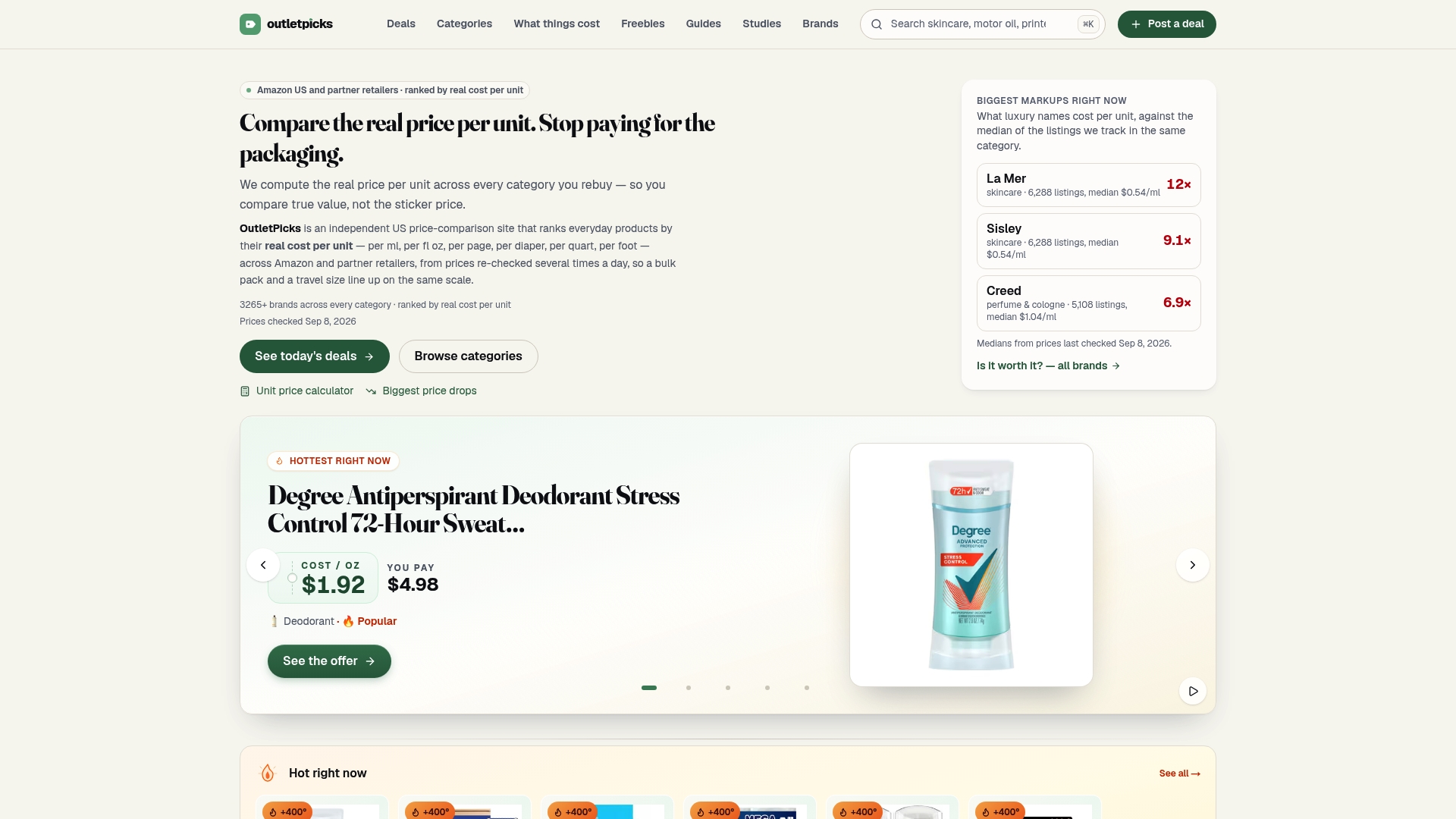
Some platforms fill that gap by calculating real cost per unit across many categories, so you're comparing apples to apples instead of sticker price to sticker price, as seen on All Products – QAI Hair. Prices may be rechecked on a rolling cycle across Amazon and partner retailers, which means the numbers may reflect current shelf reality, not a stale snapshot from weeks ago. If you're already tracking a specific item's price history and want to confirm you're picking the best size or brand within that category, start with the Outletpicks category pages and see how your target item stacks up per unit against everything else on the shelf.
Sources
Google price insights, Amazon's price history tool, and Safari's Notify Me feature cover the built-in options referenced above.
- Amazon hidden price history tool — MakeUseOf
- How to track prices with Safari's Notify Me tool — Engadget
- Amazon price tracking best practices — VisualPing
FAQ
What is the best price history tracker?
There isn't one universal best option since it depends on where you shop. Shoppers loyal to one marketplace do fine with that retailer's built in insight tool, while cross-store shoppers need a standalone tracker or app with confirmed multi-site coverage, and anyone comparing value across pack sizes benefits from a unit-price engine like Outletpicks.
Is there a website that tracks historical prices?
Yes, several exist in different forms: retailer-built tools show history for their own store only, while independent trackers and comparison sites pull data across multiple retailers. Google's price insights feature also flags whether a listed price is a 30-day low, though it doesn't predict where prices go next.
How can I track the price history of a product?
Install a browser extension for in-page charts, check a retailer's built in price history tool if one exists, or use an OS-level feature like Safari's Notify Me to watch a page for changes. For comparing value across brands or sizes rather than tracking one specific listing, a unit-price comparison page works better than a single-item chart.
How do I track previous prices without missing real deals?
Set a target price around 10 to 20 percent below the current price rather than waiting for an unrealistic markdown, since that band balances realistic savings against the odds the discount actually happens. Pair that alert with a weekly manual glance at your tracked list to catch coupon codes or seller changes automation tends to miss.
Realistic Savings Take Habits, Not Just Tools
Automation is great for catching the obvious 20 percent drop; it's terrible at noticing a coupon code buried at checkout. Rely on alerts to flag movement, then spend two minutes a week reviewing and adjusting your targets by hand. And whenever pack sizes differ, run the unit-price comparison before you trust which option is actually cheaper.
— Alex